


Table of contents
- Quick answer
- Why mirrorless usually has the video advantage
- Mirrorless vs DSLR for video, what actually changes?
- What video advantages matter most?
- Mirrorless is better for some video users than others
- Where DSLR is still fine for video
- Where a camcorder or video-first tool may still be better
- The real downsides of mirrorless video
- Spec-sheet traps to avoid
- Better, better with caveats, or not the deciding factor?
- So, should you choose mirrorless for video?
Here is the simple version first.
| Question | Short answer |
|---|---|
| Are mirrorless cameras better for video? | Usually yes for modern video and hybrid shooting. |
| Are they better than DSLRs for every video job? | No. Workflow matters. |
| Are they especially good for YouTube, vlogging, and solo shooting? | Often yes. |
| Are all mirrorless cameras good for video? | No. Some are photo-first or limited by heat, ports, battery, or file demands. |
| Is a DSLR still usable for video? | Yes, especially for controlled, occasional, or budget shooting. |
| Can a camcorder still be the better tool? | Yes, especially for long recording, zoom-heavy work, and audio-heavy jobs. |
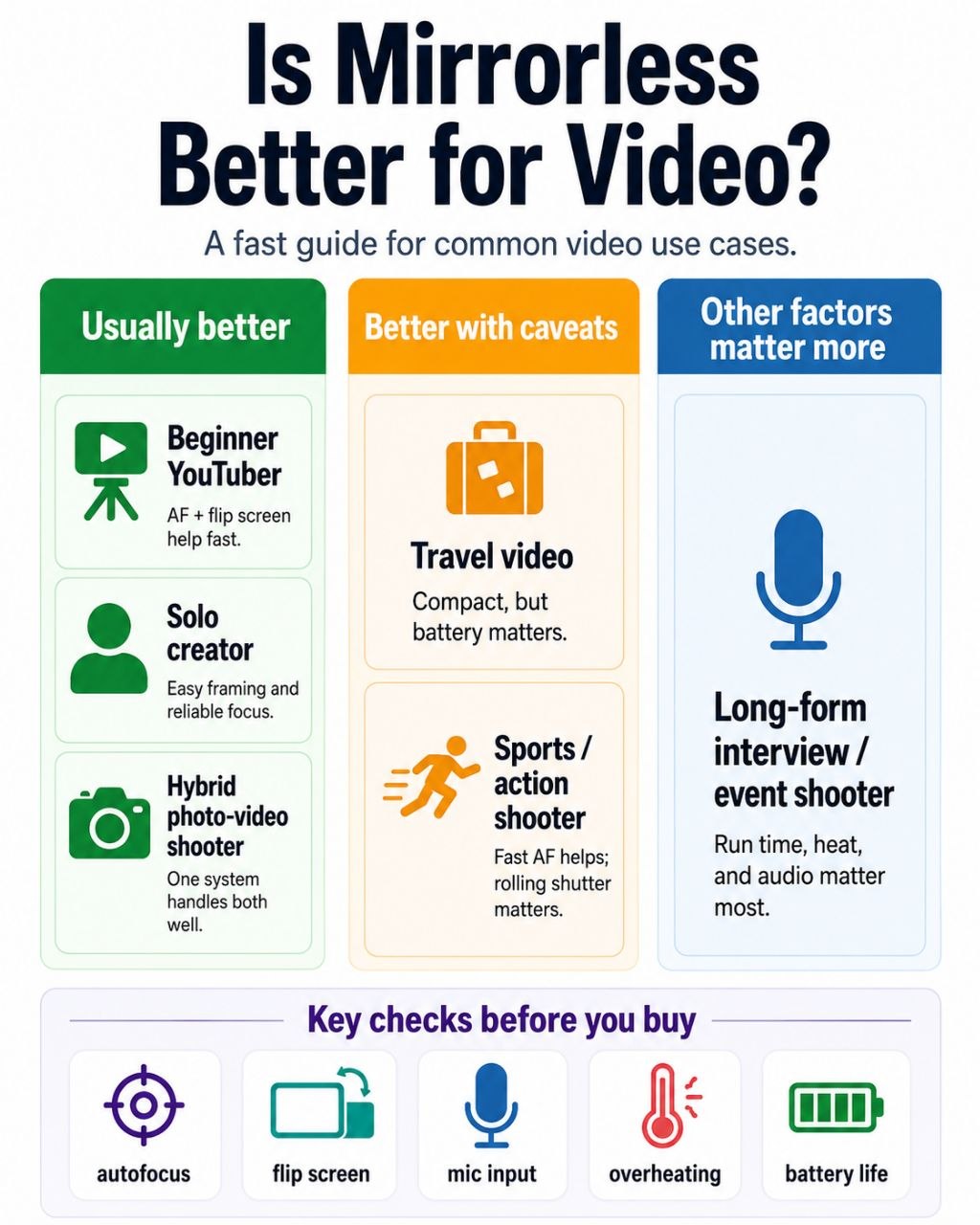
Mirrorless for Video Decision Matrix
Why mirrorless usually has the video advantage
Mirrorless cameras are built around live view from the sensor.
That matters because video shooting already depends on a live sensor feed. In a mirrorless camera, the design is already centered on that workflow.
Live-view-first design
A mirrorless camera does not need to switch into a secondary “video-style” way of working the same way older DSLR systems often did. The camera is already built around sensor-fed composition through the rear screen or EVF.
On-sensor autofocus
This is one of the biggest practical reasons mirrorless usually feels stronger for video.
For many users, especially solo shooters, creators, and casual hybrid users, video gets much easier when the camera can track people and subjects more naturally while recording.
Better match for hybrid shooting
Mirrorless systems are often where current feature development is concentrated for people who want one camera for both photos and video. That makes the category a stronger default if you are not buying a dedicated video-only tool.
Screen-first shooting fits modern video better
Flip screens, touch tracking, and live framing matter more to many video users than old stills-first camera assumptions.
Mirrorless vs DSLR for video, what actually changes?
This page is not meant to replace a full mirrorless-vs-DSLR comparison, but the video difference is worth spelling out clearly.
Autofocus while recording
This is one of the biggest real-world differences.
A DSLR can still make good video, but many mirrorless systems give users a smoother, easier autofocus workflow for:
- talking-head videos
- casual movement
- family video
- handheld clips
- hybrid shooting
Framing and monitoring
Mirrorless cameras usually fit rear-screen shooting more naturally. That matters for:
- self-recording
- low or high angles
- hybrid use
- casual travel clips
Handheld flexibility
Mirrorless bodies often combine smaller designs, stabilized lenses, and sometimes IBIS in ways that appeal to handheld users.
That does not mean every small mirrorless body is great for handheld video. It means the category often has more relevant options.
Stills and video in one workflow
For many people, mirrorless wins not because it is the best pure video tool on earth, but because it is a better mixed photo/video tool than a DSLR for current workflows.
What video advantages matter most?
This is where buyers can waste a lot of time on the wrong specs.
Reliable continuous autofocus
For many users, this is the first real advantage that matters.
If you film yourself, track people, or move while recording, autofocus performance can change the whole experience.
Flip screen or articulating screen
A camera that is awkward to frame is harder to use well. This matters quickly for:
- vlogging
- solo shooting
- tripod talking-head setups
- travel clips
Stabilization
IBIS or lens stabilization can help, especially for handheld shooting.
But this needs honest framing.
Stabilization helps.
It does not replace good movement technique, a tripod, a monopod, or a gimbal when the job really needs them.
Audio support
Video quality is not only image quality.
A camera can look great on paper and still be annoying if the audio setup is weak. Mic input matters quickly. Headphone monitoring matters more as the work becomes more serious.
Heat and recording reliability
This is one of the biggest reality checks in mirrorless video.
A compact body can look exciting because of 4K, high frame rates, or 10-bit options, then become much less exciting if it overheats or becomes awkward in long sessions.
Lenses and lens behavior
Video-friendly lenses matter more than many buyers expect. This is one of the clearest places where can you use DSLR lenses on mirrorless cameras overlaps with video buying advice.
Things like autofocus noise, focus behavior, balance, and stabilization all matter. This is one reason native mirrorless lenses are often a better long-term video choice than adapted DSLR lenses.
Mirrorless is better for some video users than others
This is where the article becomes useful instead of generic.
YouTube and vlogging
Mirrorless is often the better default here.
Flip screens, autofocus, compact setups, and direct creator-oriented features make a lot of sense in this lane.
Beginner creators
Mirrorless usually gives beginners a simpler video starting point when it has:
- dependable autofocus
- a usable screen
- mic input
- manageable file formats
Beginners often do not need the most advanced codecs first. They need a camera that gets them recording without too much friction. If they are still deciding whether mirrorless is even the right beginner category, are mirrorless cameras good for beginners should sit right beside this page in the cluster.
Hybrid photo/video shooters
This is one of the strongest mirrorless wins.
If one camera needs to handle photos and video well enough without becoming a pain, mirrorless is usually the safest category to start in.
Travel and handheld video
Mirrorless often helps here, but with caveats.
Smaller bodies are easier to carry, but small bodies are not always better at heat, battery life, or balance once a lens and accessories are added.
Weddings, events, and documentary work
Mirrorless can be excellent here, especially for autofocus and hybrid capture.
But this is also where battery life, dual-card confidence, overheating, lens behavior, audio, and recording reliability start to matter much more than marketing language.
Long interviews or long-form recording
This is one of the places where “mirrorless is better” becomes less automatic.
If long uninterrupted recording and reliability matter more than interchangeable-lens style or shallow depth of field, a camcorder or more video-first tool may be the smarter answer.
Where DSLR is still fine for video
It is important not to overstate the case.
A DSLR can still be good enough if the work is:
- controlled
- tripod-based
- manual-focus friendly
- occasional
- budget-driven
That is especially true if the person already owns the gear and understands its limits.
The weakness is usually not that DSLR video is inherently ugly. The weakness is more often workflow, autofocus, monitoring convenience, or current feature support.
Where a camcorder or video-first tool may still be better
This is another section that adds trust.
A mirrorless camera is not automatically the best answer when the job leans toward:
- long recording times
- audio-heavy setups
- run-and-gun zoom use
- event coverage
- ergonomic comfort over long sessions
That is why camcorders still exist. They solve different problems, and sometimes they solve them better.
The real downsides of mirrorless video
This is where hype needs to be cut down.
Battery life
Video drains batteries fast. Small mirrorless bodies often need spare batteries or USB power planning sooner than beginners expect.
Overheating
Some bodies handle heat well. Some do not. Some compact creator cameras look strong on paper but run into thermal limits in tougher modes or longer sessions.
Rolling shutter
This is not just a spec-sheet footnote. Fast movement or pans can distort in visible ways depending on the sensor readout behavior.
Audio accessories and workflow creep
A camera body can be only the start. Real video work often adds:
- external microphones
- headphones
- extra batteries
- cages or mounting gear
- storage upgrades
- better support gear
Menu and setup complexity
Mirrorless can be easier than DSLR for many video workflows, but that does not mean every mirrorless camera is simple.
Spec-sheet traps to avoid
This section matters a lot for beginners and semi-beginners.
4K is not enough information by itself
Not all 4K is equally useful. Crop, heat, bitrate, autofocus behavior, and file size matter too.
4K/60 can come with tradeoffs
High frame rates can look attractive while introducing crop, heat, battery drain, or larger storage demands.
10-bit and Log are not mandatory for everyone
These are valuable tools when you know why you need them. They are not automatic upgrades for casual users making simple content.
6K and 8K can create workflow problems
More resolution is not always a free win. Storage, editing strain, heat, and battery demands can rise fast.
IBIS is not a gimbal
Helpful, yes. A magic replacement for movement technique or proper support, no.
A mic input does not guarantee good audio
Good audio still depends on the microphone, placement, room sound, monitoring, and how the whole setup is used.
Better, better with caveats, or not the deciding factor?
This is the cleanest decision version.
| Video factor | Mirrorless advantage | Practical takeaway |
|---|---|---|
| Live-view-first shooting | Better | Mirrorless design fits video naturally. |
| Continuous autofocus | Usually better | Strong advantage, but body and lens still matter. |
| Vlogging and solo shooting | Usually better | Screen design, AF, and creator-focused features help. |
| IBIS and handheld work | Better with caveats | Helpful when present, but not universal or magical. |
| Codecs and advanced formats | Better with caveats | Valuable only if the workflow needs them. |
| Long recording | Better with caveats | Some bodies still overheat or struggle over time. |
| Audio | Not automatically better | Ports and accessories matter a lot. |
| Low light | Not the deciding factor | Sensor, lens, and exposure matter more than category alone. |
| Portability | Better with caveats | Small body does not always mean small or simple setup. |
| Image quality | Not automatic | Lighting, lens, exposure, and recording mode matter more. |
So, should you choose mirrorless for video?
If you want the strongest default path for modern video, mirrorless is usually the better place to start.
That is especially true if you care about:
- YouTube or content creation
- hybrid photo/video use
- solo shooting
- autofocus help
- flexible screen-based shooting
- access to current feature development
But you should keep the answer conditional.
If your work is long-form, audio-heavy, zoom-driven, or highly reliability-focused, a camcorder or more video-first tool may still make more sense.
If your current DSLR already handles your controlled video use well enough, there may be no urgent reason to switch.
The best final answer is this:
Mirrorless is usually better for modern video, but not because the label itself is magic. It is better when the camera’s autofocus, screen behavior, stabilization, heat management, audio support, and workflow actually match the kind of video you shoot.
If you want the broader system explanation first, start with what a mirrorless camera is, then compare the bigger mirrorless vs DSLR for video question and the more specific issues of native vs adapted lenses for video and EVF vs rear screen for video.
