

The Canon R6 Mark II uses two UHS-II SD card slots. That means you do not need CFexpress, and you can get excellent performance with a good V60 card.
V60 vs V90, short answer: For most Canon R6 Mark II owners, V60 UHS-II is the sweet spot. Move to V90 only if you want extra headroom or regularly shoot the heaviest video workloads where the extra speed margin is worth paying for.
On this page
Which card should you buy?
- Stills-first shooter: a good 128GB or 256GB V60 UHS-II card is enough.
- Hybrid creator: 256GB V60 is the best all-round starting point.
- Heavy video user: start at 256GB and consider V90 only if you truly want the extra headroom.
- Dual-card backup buyer: buy two matching cards so the backup slot does not become the weak link.
Quick picks
Top pick (best value V60)
Kingston Canvas React Plus V60 256GB
Clean “don’t overbuy” pick for the R6 II. V60 is the sweet spot for serious video without paying V90 prices.
Buy this if: you want the safest value play for most R6 Mark II owners without overpaying for V90 speed you may never need.
Skip this if: you already know you want maximum-spec headroom and do not mind paying more for it.

Best mainstream alternative (V60)
Easy brand-recognition buy. Great choice if you just want a known name in a V60 card.
Best starter / lower-entry pick (V60)
Lexar Professional SILVER PRO V60 128GB
Good for stills-first buyers and lighter video work, or a matched-pair budget setup.

Best pro-workflow alternative (V60)
Strong creator-brand pick if you care about consistent workflow and sustained performance.

Premium / max-headroom pick (V90)
Kingston Canvas React Plus V90 256GB
“Buy once and stop thinking about it.” V90 is not required for most people, but it’s a clean premium upgrade.

Rugged-angle option (V60)
If you want a tougher card angle (dust/water resistance) while staying in the V60 tier.

How to choose (in 60 seconds)
Step 1: Buy UHS-II (not UHS-I)
Look for UHS-II in the listing. UHS-II cards have a second row of pins and are much faster for video and buffer clearing.
Step 2: Pick the video class
- V60 = the smart default for the R6 Mark II’s heavier published video needs.
- V90 = extra headroom. Great if money is no object, but most people don’t need it.
Step 3: Choose capacity
| Capacity | Best for | Skip if |
|---|---|---|
| 128GB | Stills-first use and lighter occasional video | You record long sessions often |
| 256GB | Best all-round buy for most creators | You want one card to cover everything with fewer swaps |
| 512GB | Travel, events, and longer video days | You prefer rotating smaller cards |
Comparison table
| Pick | Video class | Capacity | Why it wins |
|---|---|---|---|
| Kingston Canvas React Plus V60 | V60 | 256GB | Best overall value for R6 II, strong performance without paying V90 prices. |
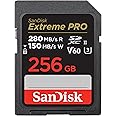
| SanDisk Extreme PRO V60 | V60 | 256GB | Most recognizable mainstream buy, easy to feel confident. |
| Lexar SILVER PRO V60 | V60 | 128GB | Lower entry price, still UHS-II/V60 for solid real-world use. |
| ProGrade Digital V60 | V60 | 256GB | Great “creator workflow” brand if you care about consistency. |
| Kingston Canvas React Plus V90 | V90 | 256GB | Premium “max headroom” option, not required but nice. |
| OWC Atlas Pro V60 | V60 | 256GB | Rugged-angle option if that matters to you. |
Building out your R6 Mark II kit? Also see what memory cards the Canon R6 Mark II uses, the full Canon R6 Mark II guide, and the best battery and charger options.
FAQ
Does the Canon R6 Mark II use CFexpress cards?
No. The Canon R6 Mark II uses SD/SDHC/SDXC cards. Both slots are UHS-II.
Do I need a V90 SD card for the Canon R6 Mark II?
For most people, no. A good V60 UHS-II card is the smart default. V90 is extra headroom if you want to overbuild.
Can I use a microSD card with an adapter?
Not recommended. Canon’s guidance is that UHS-II microSD cards used with an SD adapter are not recommended.
What capacity should I buy?
- 128GB is fine for stills-first and occasional video.
- 256GB is the best all-rounder for most creators.
Do both Canon R6 Mark II card slots support UHS-II speeds?
Yes. The Canon R6 Mark II has two UHS-II SD card slots.
Should I buy two matching cards for dual-slot backup?
Usually, yes. Matching cards make dual-slot use simpler and help avoid one slower card becoming the weak point in your setup.
Want the quick compatibility page too? See: What memory cards does Canon R6 Mark II use?
